

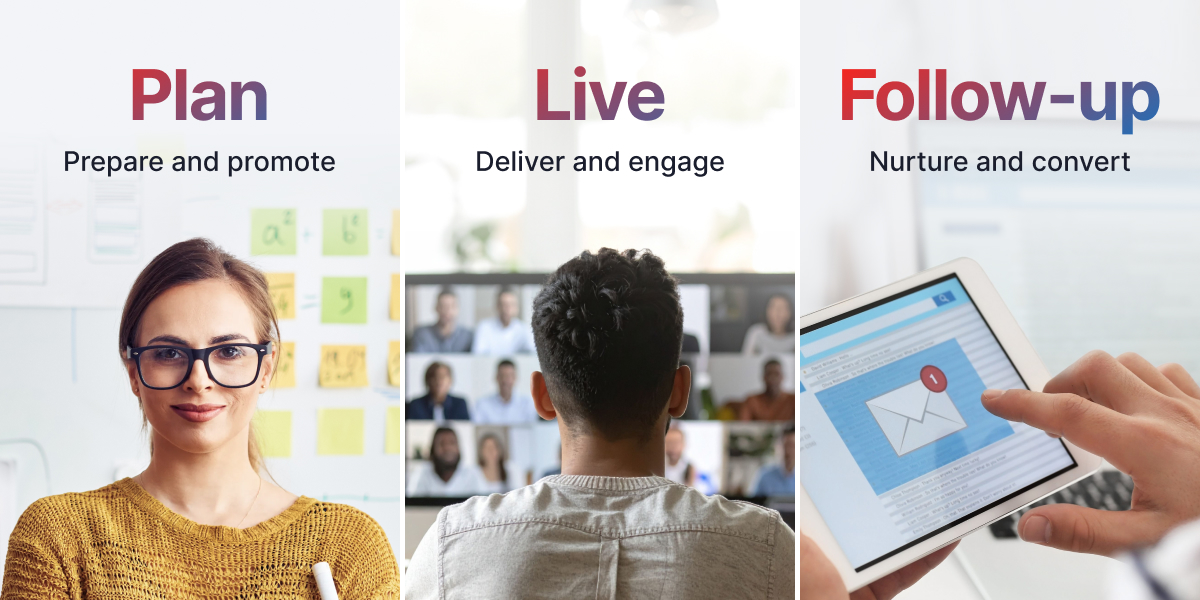
Most business owners put almost all their effort into the lead-up to a webinar. They grind for weeks to get registrations, host the live presentation, send the replay in an email, and move on to the next project.
The result is great sign-up numbers on paper, but very little revenue in the bank.
If you want a webinar actually to drive meaningful conversions, you will need a webinar marketing strategy, and it has to be treated like a campaign with three distinct jobs:
- Get the right people in the room.
- Hold their attention until your sales pitch.
- Follow up based on how they engaged with your event.
Breaking your campaign into these three jobs makes it much easier to spot where prospective buyers are slipping away, and figure out what to fix first.
Here is how to run the process end-to-end, from early planning and promotion to live delivery, follow-up, and automation.
Table of Contents
The Three-Number Rule
A webinar can look successful on paper and still fall short where it matters.
You might have a landing page that converts incredibly well, for example, but if only a small percentage of those registrants actually show up, those sign-ups aren’t doing much for your bottom line.
That’s why it helps to look at three numbers separately:
- Registration Rate: Traffic → Registrants
- Attendance Rate: Registrants → Live Attendees
- Conversion Rate: Attendees & Replay Viewers → Paying Customers
Consider two different campaigns:
- Campaign A: The landing page converts at 40%, but only 15% of sign-ups show up live.
- Campaign B: The landing page converts at 25%, but 45% show up live.
At first glance, Campaign A might look like the stronger campaign. It brought in more registrants, after all.
But Campaign B gets far more of those people into the actual webinar, where they can hear your message and see your offer.
Looking at these numbers separately also makes it easier to understand where people are dropping off. If you have a….
- Low registration rate, take a closer look at your title, positioning, webinar landing page, or audience targeting.
- Low attendance rate, your reminder sequence or the expectations you set before the webinar may need some attention.
- Low conversion rate, look at what happens during and after the webinar, including the content, call to action, when you introduce the offer, and how that buyer journey looks.
A single conversion rate can tell you that something isn’t working. These three numbers can help you figure out what it is.
Phase 1: Plan and Promote Your Webinar
Generating sign-ups is easy. Getting qualified buyers to block off 45 minutes on a Tuesday afternoon is harder. Your promotion needs to focus on driving live show-up rates, not just inflating registration totals.
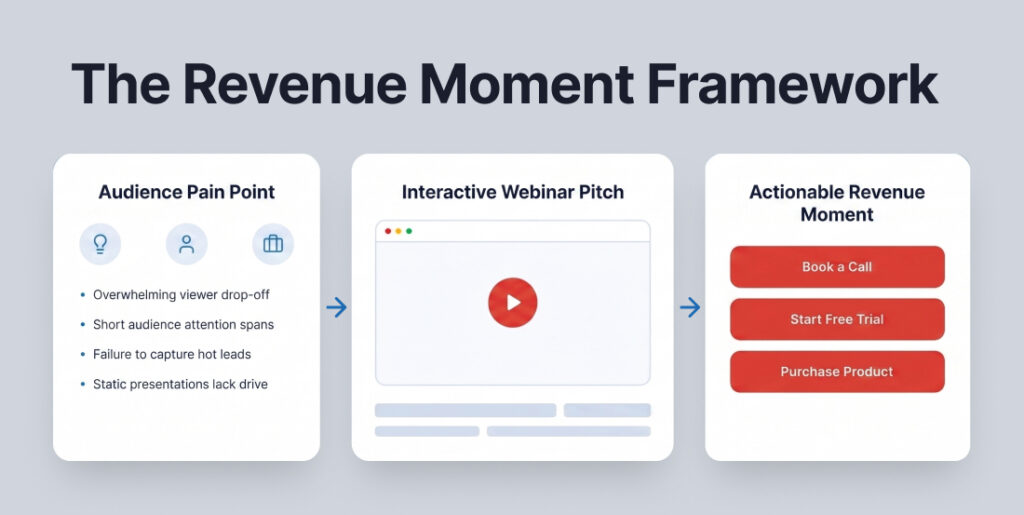
1. Define the “Revenue Moment” First
Before you plan your webinar, decide what you want people to do after they watch it.
Maybe you want them to:
- Book a call
- Start a free trial
- Fill out an application
- Buy your product
That action is your revenue moment.
Once you know what it is, you can build the webinar around helping people get there.
For example, someone who is just learning about the problem you solve probably needs more education before they’re ready to buy. Someone who already knows they need a solution may be more interested in seeing how your product works and why they should choose it.
Think about who you’re trying to reach and what they need to hear before taking the next step.
Then use that to shape the entire webinar, including the title, what you teach, and the offer you make at the end.
2. Pick the Right Format
Match your format to what your audience actually needs right now:
- Teaching Sessions: Best for early-stage buyers working through a problem. Give away genuine value before asking them to consider your product. Nurture leads afterwards to keep your brand awareness top of mind.
- Product Demos: Best for late-stage buyers evaluating tools. Keep these short, highlight key workflows, share a few relatable case studies, and make the next step effortless.
- Panel Discussions: Great for expanding reach by leveraging multiple guest speakers. However, panels are harder to moderate and rarely convert well for direct sales pitches.
- Q&A Sessions: Only work if your audience already knows who you are and comes prepared with questions.
- Virtual Events: A multi-day event isn’t just a long webinar. Attendees dip in and out between sessions, which requires dedicated event management.
3. Write a Title That Acts as a Filter
A good webinar title does more than get attention. It helps the right person see your webinar and immediately think, “This is for me.”
Compare these two titles:
❌ Too vague: Free Webinar: Scale Your Business in 2026
✅ More specific: How B2B SaaS Founders Lower Churn Without Discounting
The second title tells you exactly who the webinar is for and what they’ll learn. Someone struggling with that problem has a clear reason to sign up.
When writing your title, try to include who the webinar is for, the problem you’re helping them solve, and the result they can expect. Together, those pieces make your value proposition much clearer.
You don’t need to appeal to everyone. You just need the right people to recognize that the webinar was made for them.
4. Keep Your Registration Page Focused
Your registration page only needs to give someone enough information to decide if the webinar is worth signing up for. Adding more copy doesn’t always make it more convincing. Sometimes it just gives people more to sort through.
Keep the page simple:
- A clear headline that speaks to what your audience wants to accomplish
- A supporting subheadline that adds a little more context. You can expand on the outcome or speak to the problem they’re trying to solve.
- 3 to 4 bullet points that tell people what they’ll learn
- A little social proof, such as a testimonial, customer logos, or the number of people who have attended past events
- The date and time
- A short registration form. Name and email are usually enough.
Do you need to mention the sales pitch on the registration page?
Not necessarily. If you’re making an offer during the webinar, you can set that expectation once the webinar begins. Your registration page is there to help someone decide whether they want to attend. If mentioning the offer doesn’t help them make that decision, it doesn’t need to be there.
5. Use More Than One Promotion Channel
There are plenty of ways to promote a webinar, and you don’t have to rely on just one. A mix of email, partnerships, paid ads, and organic content can help you reach people in different places.
Email: Start with the audience you already have. These people know your business, so they’re often more likely to register and show up. Test different subject lines as you go. A small change there can make a difference in how many people open your emails and ultimately attend.
Co-marketing and guest speakers: Consider bringing in a guest or partnering with a business that serves a similar audience without directly competing with you. You’ll get your webinar in front of people who may not know your business yet, but already trust the person or company introducing you.
Paid advertising: If you’re running ads, don’t look at registrations alone. Pay attention to how many of those registrants actually attend. Getting 500 registrations doesn’t mean much if very few people make it to the webinar.
Organic promotion: Share the webinar anywhere your audience already spends time with you. That could mean social posts, clips from past webinars, your blog, a podcast, or other content you’re already creating. SEO can support your webinar strategy over time, but it usually isn’t the best option when you need registrations for an event happening soon.
6. Build a 6-Touch Reminder Sequence
People sign up for webinars with every intention of attending, but life gets in the way. Meetings run long, schedules change, and sometimes people simply forget.
That’s why one calendar invite usually isn’t enough.
A combination of email and text message reminders can help keep your webinar top of mind without asking people to remember the date and time on their own.
Here’s a simple schedule you can use:
Immediately after sign-up: Send a confirmation email with the webinar details and a link to add the event to their calendar.
24 hours before: Your webinar promotion isn’t over just because someone registered. Remind them why they signed up in the first place and what they’ll get from attending. Give them a reason to make time for it when tomorrow comes.
3 hours before: Let them know you’ll be going live soon.
15 minutes before: Send the direct link to join. Put it near the top of the message so it’s easy to find, especially on a phone.
5 minutes before: Send one last reminder that you’re about to start.
You don’t need to write a brand-new sales pitch for every reminder. Keep them short, useful, and focused on making it easy for people to show up.
Phase 2: Engage and Convert
Every live webinar loses viewers as time goes on. You won’t keep 100% of the room until the end, so focus on keeping the right people engaged until you introduce your offer.
1. Build Your Presentation Around the Offer
If you’re selling something at the end of your webinar, the offer shouldn’t come out of nowhere. What you teach during the webinar should naturally lead into it.
Before you introduce your offer, your audience should understand:
- The problem they’re trying to solve
- Why the things they’ve already tried may not be working
- What they can do differently
- How you can help
- Why it makes sense to take the next step now
Think of your presentation as the lead-up to the offer. You’re giving people the information they need to understand the problem and what it will take to solve it.
Then, when you introduce your product or service, it feels connected to everything they just learned instead of tacked onto the end.
2. Make the Offer Before Retention Drops
Don’t wait until minute 55 to introduce your offer just because standard templates put the pitch at the end. Look at your past attendance graphs. If people routinely start dropping off around minute 40, your pitch needs to happen at minute 35.
3. Use Tools to Keep People Engaged
It’s easy for people to get distracted during live webinars. They’re watching from a computer or phone, which means email, Slack, social media, and a dozen other things are only a click away.
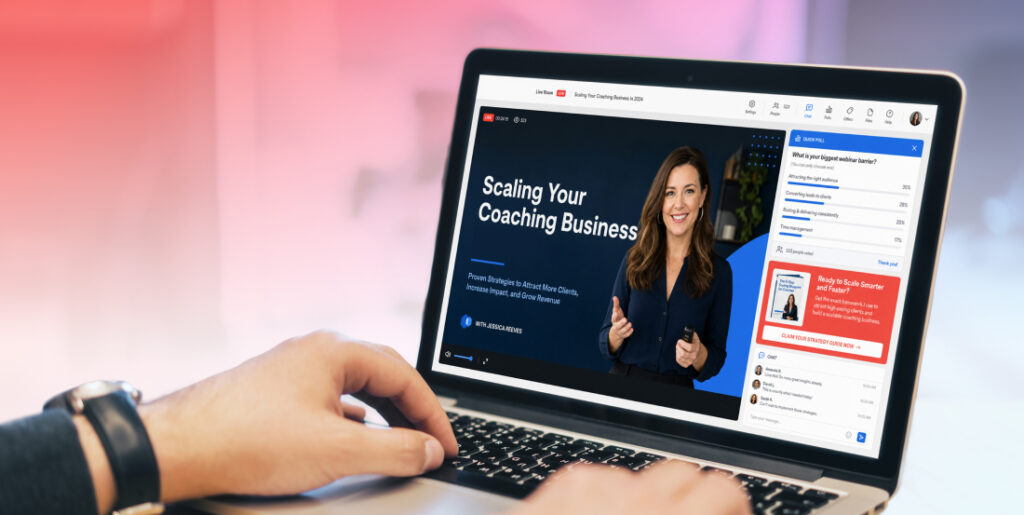
Interactive elements like polls, chat, Q&A, and clickable offers give people a reason to participate instead of just watching in the background.
A few ways to use them:
Ask a question early: Try asking a simple question in the chat within the first five minutes. It gets people involved right away and makes it more likely they’ll participate again later.
Add a poll: Use a poll when you’re moving into a new topic or getting ready to introduce your offer. It gives people something to do and brings their attention back to the webinar.
Make your offer clickable: When it’s time to make your pitch, put the offer directly on the screen so attendees can take action without having to search for a link. Webinar software like WebinarJam lets you display clickable offers during live webinars.
4. Track What People Do During Your Webinar
Registration numbers only tell you so much. It’s also helpful to know what happens after someone signs up.
Connect your webinar platform to your CRM, or use a platform like WebinarJam that keeps this information together for you.
At a minimum, you’ll want to know:
- How many people registered
- How many actually attended
- How long they stayed
- What percentage of attendees were there when you made your offer
This gives you a much better idea of what each person saw and what they missed.
For example, someone who registered but never attended probably needs a reason to watch the replay. Someone who stayed through your offer but didn’t buy may need more information before making a decision.
When you have that context, your follow-up can match where each person actually left off.
Read our blog to learn more about the webinar metrics that predict revenue and how to read them.
Phase 3: Follow Up and Scale
Your live webinar is only a fraction of your webinar funnel. Plenty of people will register and never attend live, while others may attend but need more time until they’re ready to buy.
That means there’s still an opportunity to make sales after the webinar ends. With marketing automation in place, you can follow up with each group based on what they saw, what they missed, and what they may need to hear next.
1. Follow Up Based on What People Watched
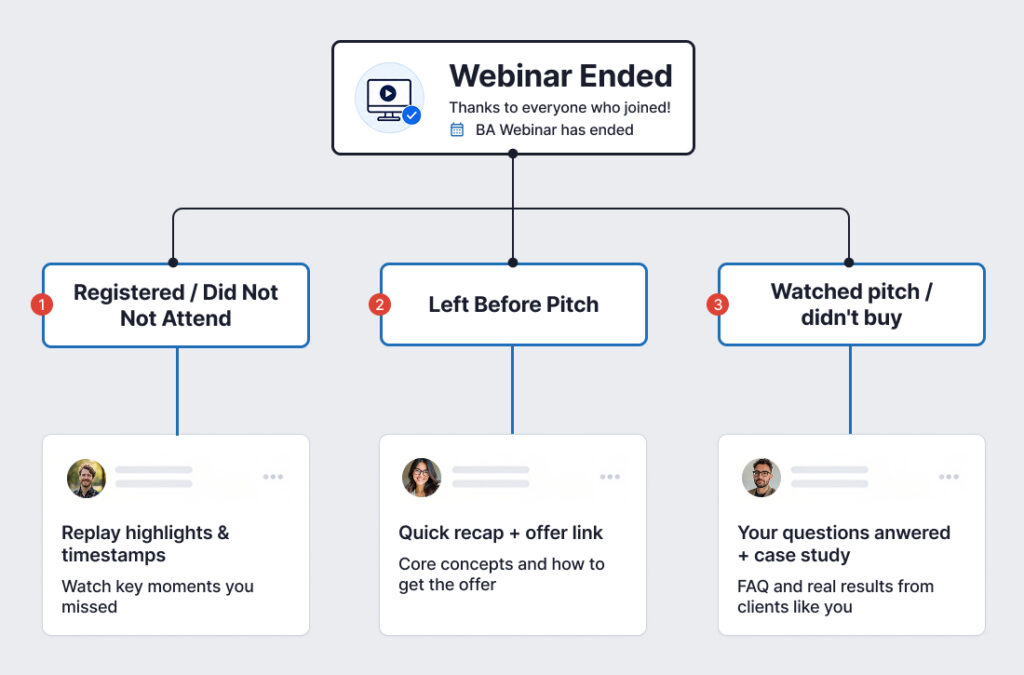
Not everyone who registers for your webinar has the same experience. Some people won’t make it at all. Others will watch for a while and leave. And some will stay long enough to see your offer but decide not to buy.
Sending all of those people the same reply email misses an opportunity to pick up where they left off.
Registered but didn’t attend: These people haven’t seen your webinar or heard your offer yet. Give them a reason to watch the replay. You can highlight something they’ll learn or include a few timestamps so they can jump to the parts that interest them most.
Left before the offer: They’ve already seen some of your webinar, so you don’t need to start from the beginning. Remind them of what they learned and encourage them to come back for the part they missed.
Saw the offer but didn’t buy: These people made it all the way to your offer but weren’t ready to take the next step. Your follow-up can answer common questions, share a relevant customer story, or provide more information to help them make a decision.
The more you know about what someone actually watched, the easier it is to send a follow-up that makes sense for them.
2. Ask Non-Buyers What Held Them Back
If you aren’t sure why attendees didn’t buy, ask them directly. Send a simple, plain-text email a few days after the event: “Quick question…what kept you from checking out [Product Name] after the session?” The replies you get will give you invaluable feedback on pricing, friction points, and messaging.
3. Turn High-Converting Sessions into Evergreen Webinars
Once a live webinar consistently converts attendees into customers, stop re-running it manually every month.
Import the recording into automated webinar tools. Set up scheduled runs or on-demand access to turn a single successful live event into an ongoing lead-generation engine.
Key Webinar Metrics to Watch
You don’t need to track dozens of numbers to understand how your webinar is performing. Start with a few key metrics at each stage.
Before the webinar: Look at your registration rate and attendance rate. These numbers tell you how well your promotion is turning interest into registrations, and how many of those people actually show up.
During the webinar: Pay attention to how long people stay, especially how many are still watching when you introduce your offer. You can also track clicks on your offer or CTA.
After the webinar: Look at replay views, sales from your follow-up emails, and your overall customer conversion rate.
The goal isn’t to improve every number at once. Look for the point where you’re losing the most people and start there.
If registrations are strong but attendance is low, work on your reminder sequence. If people show up but leave before your offer, take a closer look at the webinar itself. And if people stay through the pitch but aren’t buying, your offer or follow-up may need more attention.
Turn Your Next Webinar Into More Than a Live Event
A webinar doesn’t have to stop working when the live presentation ends.
The Webinar Revenue Engine breaks down how experts and influencers turn one presentation into customers, booked calls, course sales, and mastermind applications.
Inside, you’ll also find 9 essential webinar tools to help you plan, promote, run, and get more from your webinars.
Frequently Asked Questions
How should you market a webinar?
Break the process into three phases: pre-event promotion focused on show-up rates, live delivery structured around retention resets, and post-event follow-ups segmented by attendee behavior.
What is a good webinar attendance rate?
Warm email lists usually yield a 35%–50% show-up rate. Cold ad campaigns average 20%–30%. If you don’t send a structured reminder sequence, expect overall attendance to hover around 30%.
How many reminder emails should you send?
At least three, but six is ideal: on sign-up, 24 hours out, morning of, 3 hours out, 15 minutes out, and right as you go live. Going beyond six touches risks driving up unsubscribes.
Should you run live or automated webinars?
Always go live first. Live sessions let you test messaging, answer real-time questions, and prove the pitch converts. Once the presentation consistently closes sales, convert it into an automated or on-demand funnel.
What is the difference between automated and on-demand webinars?
Automated webinars run on set recurring schedules to preserve a scheduled start time and urgency. On-demand webinars play instantly whenever a user lands on the page, offering immediate access at the expense of live urgency.
How long should a webinar be?
Long enough to deliver genuine value and make a compelling offer, but short enough to hold attention. A 45-to-60-minute window works well for standard B2B presentations (30 minutes content, 10 minutes pitch, 15 minutes Q&A). Targeted product demos can easily wrap up in 20 to 30 minutes.