Host Virtual Events

The virtual event platform for workshops & launches

Run multi-speaker workshops, launches, and live events without technical breakdowns, speaker confusion, or drop-offs. WebinarJam gives you full control of presenters, built-in engagement tools, and the reliability to host events that actually convert.

How to host virtual events without breakdowns

The “8 Steps To Setting Up Your First Webinar Checklist” is your quick-start guide to the WebinarJam platform and will have you ready to go live in 8 simple steps.

Eliminate Technical Friction

Secure speaker logins, rehearsal rooms, and role-based permissions remove delays, prevent host confusion, and keep every session running smoothly.

Sustain Audience Engagement

Persistent chat, polls, shared materials, moderation tools, and consistent branding maintain energy and professionalism across sessions and replays.

Protect Every Live Stream

Panic Button recovery, automatic recording, and universal browser access safeguard your event against disruptions and technical barriers.
Eliminate Technical Friction

Run every session without technical drag

Each speaker receives their own secure login with independent camera, screen share, and microphone control. This eliminates password sharing and “can you make me host?” delays. Rehearsal rooms let presenters test setups beforehand. Role-based permissions give hosts complete control.
Green Checkmark
Keep multi-speaker events organized with independent controls for each speaker.
Green Checkmark
Prevent tech hiccups on event day with rehearsal rooms for pre-event testing.
Green Checkmark
Maintain security during broadcasts with role-based permissions for hosts.
Green Checkmark
Enable instant access for all with browser-based delivery without downloads.
A speaker teaching how to host virtual events online without technical breakdowns, speaker confusion, or drop-offs
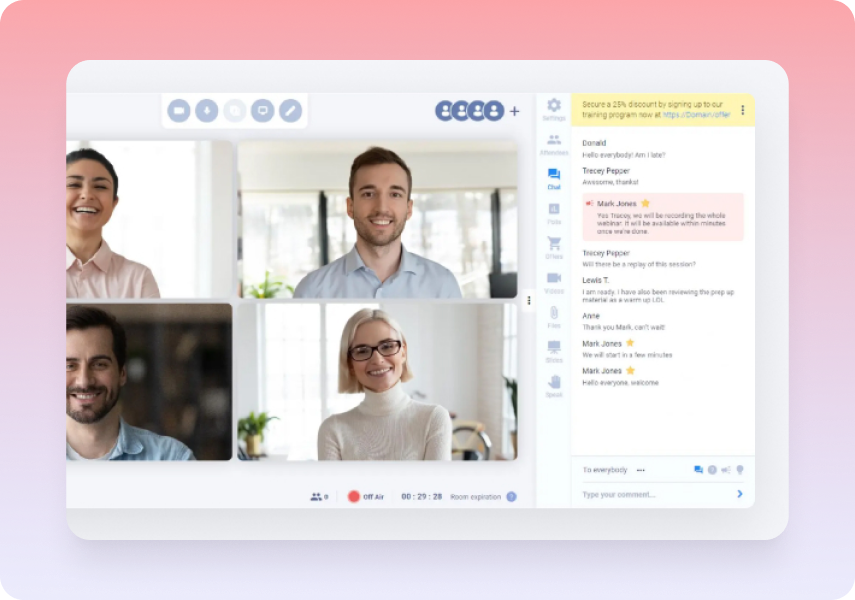
Virtual conference interface featuring live chat, moderation tools, and multi-speaker video to sustain audience engagement.
Sustain Audience Engagement

Keep audiences engaged between sessions

Chat conversations, poll results, and shared materials remain accessible during sessions and replays. Moderation tools handle large audiences while maintaining conversation quality. Consistent branding creates professional experience throughout the virtual conference.
Green Checkmark
Preserve engagement across sessions with chat and polls in replays.
Green Checkmark
Keep materials accessible with sharing during events and replays.
Green Checkmark
Manage large audiences effectively with moderation tools.
Green Checkmark
Deliver professional polish with consistent branding throughout.
Protect Every Live Stream

Stream with built-in safety nets

Internet connectivity issues occur during live events. Hosts use Panic Button to reboot webinar rooms during emergencies. Recording continues through recovery. Browser delivery avoids firewall or software compatibility problems for high-attendance live events.
Green Checkmark
Recover instantly from disruptions with Panic Button room reboot.
Green Checkmark
Support thousands of attendees with plan-based capacity limits.
Green Checkmark
Capture every moment automatically with session recording.
Green Checkmark
Eliminate setup barriers with universal browser compatibility.
A professional host hosting a virtual event on the webinar platform

Virtual Events FAQs

Up to six presenters can join the stage at once. You can rotate additional speakers throughout the event as needed.

Yes. Use moderated live chat and attendee spotlight to create interaction between speakers and attendees. For smaller group conversations, you can direct attendees into breakout-style follow-up experiences as part of your event flow.

Yes. Every session is automatically recorded. You can send replays to registrants after the event or turn recordings into evergreen content with EverWebinar.

Plans are based on attendee tiers: 100, 500, 2,000, or 5,000 attendees. You only need to upgrade when you need more capacity.

Most virtual events don’t fail because of content — they fail because of poor execution. Technical issues, low engagement, and presenter confusion lead to drop-offs and lost revenue.

Many virtual events struggle with engagement and retention, which is a common challenge across the industry (Statista research).

When you host virtual events with the wrong tools, you’re fighting the platform instead of focusing on your audience.

WebinarJam integrates with major CRM, email marketing, payment, and analytics platforms, so you can connect your existing tools without rebuilding your workflow.