

Your webinar’s over, the report’s open, and you’re staring at a 38% show-up rate and a 2.5% conversion rate.
Is that good? Honestly, it’s really hard to tell. One article says 40% attendance is average, another says aim for 55%, and a third hands you a benchmark for every metric without a single source behind any of them.
And when the numbers disagree, it’s tempting to believe whichever one makes your webinar look best.
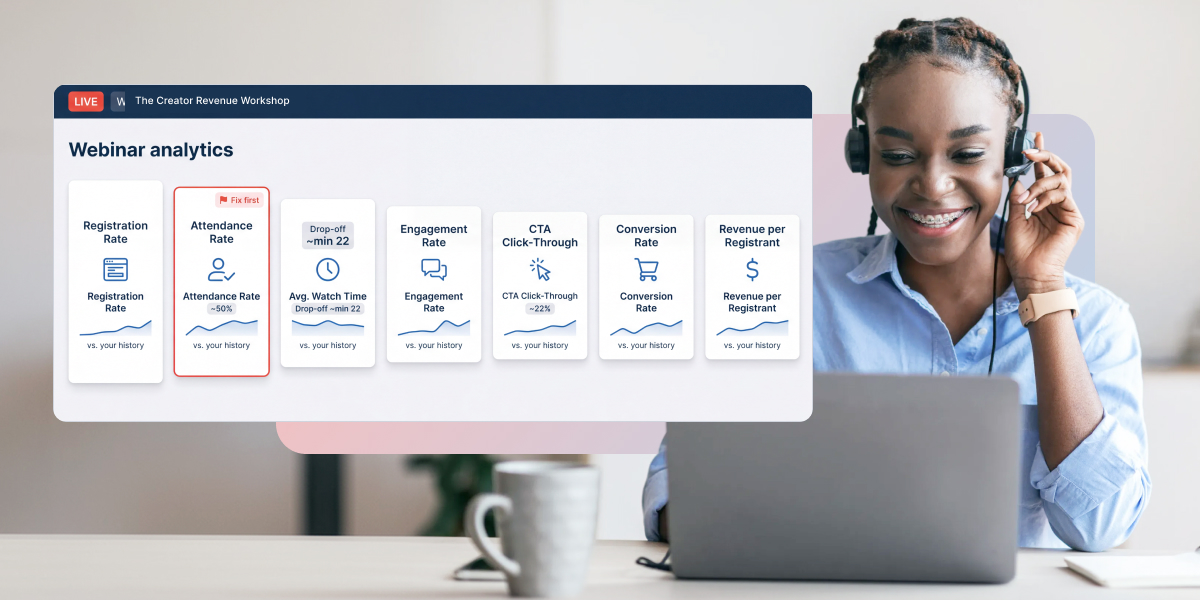
Here’s the short version. Seven webinar KPIs tell you whether a webinar is on track to make money: registration rate, attendance rate, average watch time, engagement rate, CTA click-through rate, conversion rate, and revenue per registrant. Three have benchmarks you can trust: about half of registrants attend live, viewers start leaving around minute 22, and about 22% of attendees click an in-session offer. Engagement has strong evidence but no average. For the other three, no trustworthy public benchmark exists, so your own history is the yardstick.
In this article, you’ll get the formula for each one, the benchmark or the honest reason there isn’t one, and the point where a number is low enough to act on.
Because the goal isn’t a dashboard full of good-looking numbers. It’s knowing which one to fix first.
Table of contents
- What are the benchmarks for each webinar KPI?
- Are your webinar KPIs good?
- What is a good webinar registration rate?
- How many registrants should attend?
- How long should people watch?
- Which engagement metrics predict a sale?
- What’s a good CTA click-through rate?
- Which conversion rate should you track?
- How do you know if a webinar paid off?
- Where do webinar KPIs show up in WebinarJam?
- Which webinar metrics can you stop reporting?
- Common questions
What are the benchmarks for each webinar KPI?
Three of the seven webinar KPIs have numbers you can trust, and the table shows where each one comes from. Where the benchmark says none, that isn’t a gap in our research. It’s a gap in everyone’s.
| KPI | Formula | Benchmark | Source |
|---|---|---|---|
| Registration rate | Registrants ÷ registration page visitors | No independent benchmark | Vendor figures only |
| Attendance rate | Attendees ÷ registrants | About 50% live (44 to 60%); 57 to 61% with replays | Univid, Livestorm, Contrast, ON24 |
| Average watch time | Total minutes watched ÷ attendees | Viewers start leaving around minute 22; 37% finish a 60-minute webinar | Contrast |
| Engagement rate | Attendees who interact ÷ attendees | No average; the most interactive webinars converted 69% on their CTAs | Univid |
| CTA click-through rate | Offer clicks ÷ live attendees | About 22%; 25% with two CTAs | Univid |
| Conversion rate | Buyers ÷ attendees | No reliable public benchmark | None |
| Revenue per registrant | Revenue ÷ registrants | No reliable public benchmark | None |
Multiply any rate by 100 to get a percentage. Each section below covers how to calculate the KPI, what the number tells you, and the point where it’s worth acting.
Are your webinar KPIs good?
Type the numbers from your last webinar, and the checker compares each KPI with the benchmarks above. It also points to the one to fix first: the earliest problem in your funnel.
Are your webinar KPIs good?
Type in the numbers from your last webinar. The example below updates as you go.
Fix this first
Attendance rate
Fix reminders and timing before spending more on promotion.
Registration rate
No independent benchmark
32%
Your baseline
Beat your last webinar from the same traffic source.
Attendance rate
Typical: 44 to 60% live
38%
Below typical
Send three reminders. Hosts who do see 27% higher live attendance.
Watched to the end
Average: 37% finish a 60-minute webinar
41%
Typical
At or above the average.
CTA click-through rate
Average: about 22%
17.8%
Below typical
Check timing first, then the wording.
Conversion rate
No reliable public benchmark
2.6%
Your baseline
Compare it with your last webinar.
Revenue per registrant
No reliable public benchmark
$4.97
Your baseline
Compare it with what each registrant costs you.
Benchmarks come from Univid, Livestorm, Contrast and ON24, as sourced in the table above. Engagement rate isn’t checked because no reliable average exists. Your numbers stay on this page.
What is a good webinar registration rate?
There’s no trustworthy average, so a good registration rate is one that beats your last webinar from the same traffic source.
Registration rate = registrants ÷ registration page visitors × 100. WebinarJam reports it as your sign-up rate.
The figures you’ll see quoted, anywhere from about 20% to 60%, mostly come from vendors describing their own pages. They also blend warm email traffic with cold ads, which convert very differently. So compare like with like: last month’s email traffic against this month’s, not your ads against someone else’s newsletter.
Tag each promotion link with UTM parameters, too, so you can see the rate by channel. A blended rate can hide a weak channel behind a strong one.
One quirk worth knowing. In WebinarJam, registrants can outnumber visitors when people sign up through one-click registration or auto-subscription, which inflates the rate. That’s a counting effect, not a great page.
If the rate falls below your baseline, test the headline and the promise before you spend more on traffic. WebinarJam’s split testing compares two versions of a registration page.
How many registrants should attend?
About half. Across four large datasets, between 44% and 60% of registrants attend live, and 57 to 61% watch live or on replay.
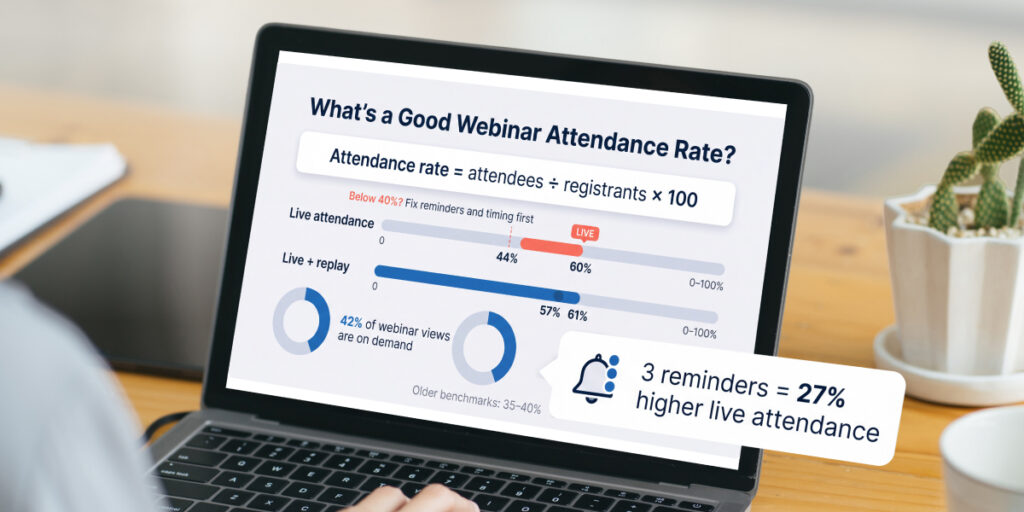
Attendance rate = attendees ÷ registrants × 100. Count live and replay separately, because they tell you different things. WebinarJam’s show-up rate already splits them.
Contrast found that 42% of all webinar views happen on demand. So if you offer a webinar recording, on-demand viewing is part of your webinar attendance rate, not an afterthought.
Older articles still quote 35 to 40% as average. Recent data sits higher.
Reminders are the first lever to pull. Contrast found that hosts who send three reminders see 27% higher live attendance.
Below 40% live, fix reminders and timing before spending more on promotion. Our guide to increasing webinar attendance covers both.
How long should people watch?
Past minute 22, at the very least. Contrast’s data shows viewers start leaving around minute 22, and only 37% of attendees finish a 60-minute webinar.
Where a 60-minute webinar loses its audience
Minutes 0 to 22
Drop-off hasn’t started yet.
Minutes 22 to 60
Viewers start leaving. By the end, 37% are still watching.
Source: Contrast, Webinar Statistics 2026
Average watch time = total minutes watched ÷ attendees. Pair it with your completion rate, the share who stayed to the end, because an average can hide a cliff.
ON24’s audiences average 49 minutes of watch time, but that’s measured on enterprise audiences, so compare with care.
The number that matters most is where people leave. That’s your drop-off rate at each point in the session, and WebinarJam’s attendee activity graph shows it in five-minute steps. Find the steepest fall and fix that section first, whether it’s a long setup or a slow demo. If you run the same webinar again, compare the graphs between sessions. A section that loses people twice is the one to rewrite.
Then put your strongest moment before minute 22, and mention your offer before the drop-off starts.
Which engagement metrics predict a sale?
The ones that count interactions. Univid found that webinars averaging 0 to 1 reactions per attendee converted under 20% on their calls to action, while those averaging 5 to 10 converted 69%.
That’s a correlation, since interested people both engage and buy more. But the gap is too big to ignore.
Engagement rate = attendees who interact at least once ÷ attendees × 100. Some platforms call it your participation rate. Count poll participation, chat activity, questions in your Q&A session and reactions. There’s no reliable average to compare against, so track it across your own webinars.
And if you don’t run polls yet, you’re in the majority. Only 40% of webinars on Univid use them.
For lead scoring, turn the same engagement metrics into an engagement score for each person: points for staying past the offer, answering a poll, asking a question. Synced to your CRM, that score is what separates a marketing-qualified lead (MQL) from someone who had the webinar on in the background.
What’s a good CTA click-through rate?
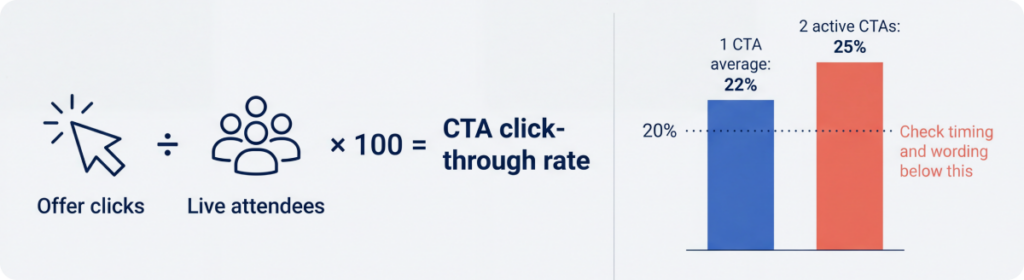
About 22%. That’s Univid’s average share of attendees who click an in-session call to action, and webinars with two active CTAs reached 25%.
CTA click-through rate = offer clicks ÷ live attendees × 100. It’s the closest thing to a sale you can see while the room’s still open.
Lower figures circulate, like 8 to 15%, without a source behind them. Go with the measured number.
Below 20%, check timing first, because an offer that appears after people have left can’t be clicked. Then check the wording. Our webinar CTA guide has ten examples and a grader for your button text.
Which conversion rate should you track?
The one that ends in money: attendees who buy, or for B2B webinars, attendees who become marketing-qualified leads.
Webinar conversion rate = buyers ÷ attendees × 100. WebinarJam calculates it this way, counting only people who entered the room, and reports live and replay sales separately.
No reliable public benchmark exists for it. The “average webinar conversion rate” of 55% or 56% you’ll see quoted is really an attendance rate, the share of registrants who showed up, relabeled. Our webinar statistics trace where that mix-up started.
For B2B, the conversion that matters often lands weeks later. Track pipeline influenced, the value of deals where a contact attended before the opportunity opened, over a fixed window such as 90 days in your CRM. That’s where lead generation turns into revenue you can point to.
How do you know if a webinar paid off?
Divide revenue by registrants. Revenue per registrant tells you what each sign-up is worth, and it doesn’t swing with volume the way total revenue does.
Revenue per registrant = webinar revenue ÷ registrants. WebinarJam shows earnings per attendee, so multiply that by your attendance rate to get there.
Say 400 people register and the webinar brings in $2,800. Each registrant is worth $7. If your ads cost $5 per registrant, the traffic paid for itself, and that’s a comparison total revenue can’t give you.
Then put it against your webinar costs: ad spend, your platform and your time, counted as hours spent × your hourly rate.
- Cost per lead = total webinar costs ÷ leads
- Webinar ROI = (revenue − costs) ÷ costs × 100
Watch that last formula. Plenty of articles divide revenue by costs and call the result return on investment. But a webinar that makes $2,000 on $1,000 of costs has a 100% ROI, not 200%.
Right
Webinar ROI
(revenue − costs) ÷ costs
($2,000 − $1,000) ÷ $1,000 = 100%
Common mistake
Revenue ÷ costs
A return ratio, not ROI
$2,000 ÷ $1,000 = 200%
There’s no trustworthy benchmark here either. The cost per lead figures that circulate trace back to vendor blog posts, not research. And only 12% of marketers track revenue as their main webinar metric, while 39% track leads, in Contrast’s survey of 524 marketers.
Being in the 12% is the advantage.
Where do webinar KPIs show up in WebinarJam?
Five of the seven webinar KPIs are on WebinarJam’s Analytics page, filtered by webinar, session and event. Sales figures appear once revenue tracking is set up.
| KPI | Where to find it |
|---|---|
| Registration rate | Traffic: sign-up rate |
| Attendance rate | Traffic: show-up rate, live and replay |
| Average watch time | Engagement: average watch time, plus the share who watched the full webinar |
| Conversion rate | Monetization: conversion rate, live and replay |
| Revenue per registrant | Monetization: earnings per attendee, multiplied by your attendance rate |
| Engagement rate | Count poll responses, chat messages and questions from the session |
| CTA click-through rate | Add UTM parameters to your offer link, or use your checkout’s analytics |
Most webinar platforms split their webinar analytics the same way, so these webinar KPIs and formulas work wherever you host. Our guide to reading WebinarJam analytics walks through each report and what to check when a number dips.
Which webinar metrics can you stop reporting?
The counts. The number of registrations, the total number of attendees and social shares all go up when a webinar gets bigger, whether or not it gets better.
They’re fine as context, especially when brand awareness is the goal. But they aren’t webinar KPIs, because a webinar with 1,000 registrants and no sales did worse than one with 200 registrants and twelve.
Attendee feedback is the one worth keeping. A two-question post-webinar survey won’t predict revenue, but it explains why a KPI moved, which the numbers alone can’t. Think of these as webinar success metrics for the sales funnel, not for the room.
Common questions
What’s the difference between a webinar metric and a KPI?
Every KPI is a metric, but key performance indicators are only the few tied to your goal. Average watch time is a metric for everyone. It becomes a KPI when keeping people to the offer is the thing you’re trying to fix.
How many webinar KPIs should you track?
Track all seven, but act on one at a time. Find the stage that sits furthest below its benchmark or your own baseline, fix that, and leave the rest alone until the next webinar. Change three things at once and you won’t know which one worked.
How often should you review webinar KPIs?
Check the in-room numbers, attendance, watch time, engagement and clicks, within a day or two, while the session is fresh enough to explain them. Sales and leads need a week or more to land, and pipeline needs a quarter, so review those on their own schedule.
Sources
- Univid, Webinar Insights 2026
- Contrast, Webinar Statistics 2026, including its survey of 524 marketers
- Livestorm, 2026 Webinar Benchmark Report
- ON24, 2026 Webinar Benchmarks Report
- WebinarJam Help Center, View webinar analytics, July 2026