


Running a webinar sounds simple until you’re the one responsible for it.
You have to choose a webinar platform, create a landing page, prepare your webinar presentation, send reminder emails, manage registrants, and make sure the tech actually works when it’s time to go live.
That’s why so many coaches, consultants, and experts end up second-guessing themselves before the webinar even starts, worrying they’ll forget something important or look unprepared live.
The good news is you don’t need a complicated funnel or a giant marketing team to run a successful webinar. You just need a clear, step-by-step process.
This webinar setup checklist will walk you through everything you need before your live event starts so you can feel prepared, professional, and confident when attendees join the room.
Want a Simpler Way to Run Webinars Without Missing Important Steps?
The hardest part of webinar setup usually isn’t the content. It’s keeping registration, reminders, follow-up, and conversion systems organized without feeling overwhelmed.
That’s exactly what the WebinarJam Kit was built for.
Inside, you’ll get:
Everything is designed to help you run smoother, higher-converting webinars without turning webinar setup into another full-time job.
Why Most Webinars Fail Before They Even Start
A weak webinar usually isn’t caused by bad content.
In most cases, the presenter already knows their topic well. The problem is the setup around the webinar.
Maybe the landing page wasn’t clear. Maybe reminder emails were inconsistent. Maybe the webinar software glitched because no one tested the setup ahead of time.
Sometimes webinar attendees simply lose interest because the webinar experience feels rushed or disorganized.
That’s why the most successful webinars feel less like isolated events and more like repeatable systems that consistently generate attendance, engagement, and conversions.
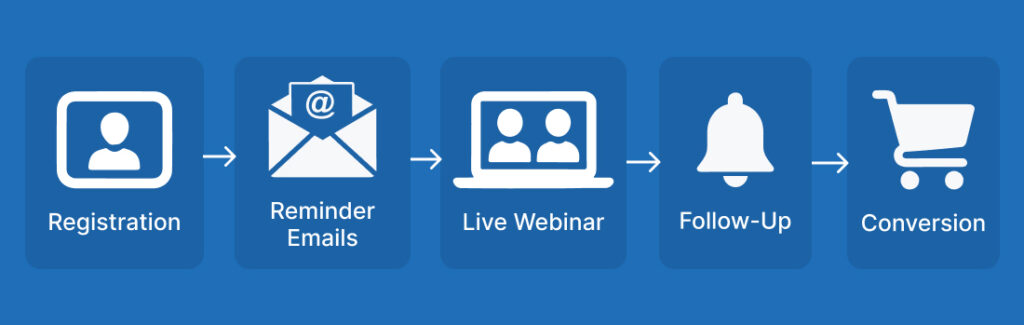
A strong webinar system includes:
- a clear topic
- a reliable webinar platform
- a simple registration process
- reminder emails
- audience engagement
- post-webinar follow-up
When all those parts work together, your webinar feels smooth and intentional from start to finish.
Webinar Strategy Checklist Before You Touch the Tech
Before you open your webinar software or design slides, you need a clear webinar planning process.
This is the step many people skip. They focus on tools first instead of outcomes.
A better approach is to define what the webinar is supposed to accomplish before building anything around it.
Define the Goal of Your Webinar
Every webinar should have one primary goal.
That goal shapes your webinar presentation, your call to action, and the way you guide attendees through the session. Your goal might be:
- selling a coaching program
- booking consultations
- generating leads
- promoting a course
- building authority in your niche
You should also decide which metrics matter most before the webinar starts.
For some businesses, the most important KPIs are attendance rates and conversions. Others may focus on audience engagement, booked calls, or replay views.
For example, a financial advisor hosting a retirement planning webinar may want attendees to schedule strategy calls afterward.
A nutrition coach may want webinar attendees to join a group program.
A software consultant may use a live webinar to demonstrate a process and generate demos through their CRM.
The clearer your goal is, the easier the rest of your webinar setup becomes.
Choose a Webinar Topic People Actually Want
A good webinar topic solves one clear problem.
A weak topic sounds broad or vague.
For example:
- “How to Improve Workplace Productivity” feels generic
- “How HR Teams Can Reduce Employee Burnout Without Adding More Meetings” feels specific
Specificity improves webinar registration rates because registrants immediately understand the value. When choosing your webinar topic:
- focus on one painful problem
- promise one clear outcome
- avoid trying to teach everything at once
Simple usually performs better than comprehensive.
If possible, bring in examples from real customers, industry experts, or case studies to make the webinar feel more grounded and practical.
Decide Between Live, Automated, or Hybrid Webinars
Your webinar format affects both your setup and your long-term strategy.
A live webinar works well when:
- you want real-time engagement
- you plan to answer questions
- urgency matters
An automated webinar works well when:
- you want consistent lead generation
- you want attendees registering daily
- you need more scalability
Some businesses also use an on-demand webinar model where attendees can watch sessions on their own schedule.
Hybrid webinars combine both approaches. Some businesses run automated webinars with live chat or periodic live Q&A sessions.
Others use pre-recorded webinar presentations with live co-hosts moderating chat and answering questions in real time.
There’s no perfect format for every business.
What matters is choosing the webinar hosting approach that fits your goals, schedule, and target audience.

Webinar Tech Setup Checklist
Technology problems can destroy trust fast.
Even great webinar content feels less valuable when audio cuts out or attendees struggle to join the webinar room.
The good news is most webinar tech issues are preventable.
Choose the Right Webinar Platform
Not all webinar software is built the same.
Some tools are overloaded with features but difficult to use. Others are simple but lack the automation or interactive features growing businesses need.
When evaluating a webinar platform, look for:
- reliable streaming
- attendee capacity
- replay functionality
- webinar recording capability
- automated reminders
- chat and engagement tools
- integrations with your CRM
- easy webinar registration management
Ease of use matters more than flashy features.
If your webinar setup feels stressful every time you go live, the platform may be creating more friction than support.
Test Your Audio, Video, and Internet Connection
Never assume your setup will work perfectly without testing it.
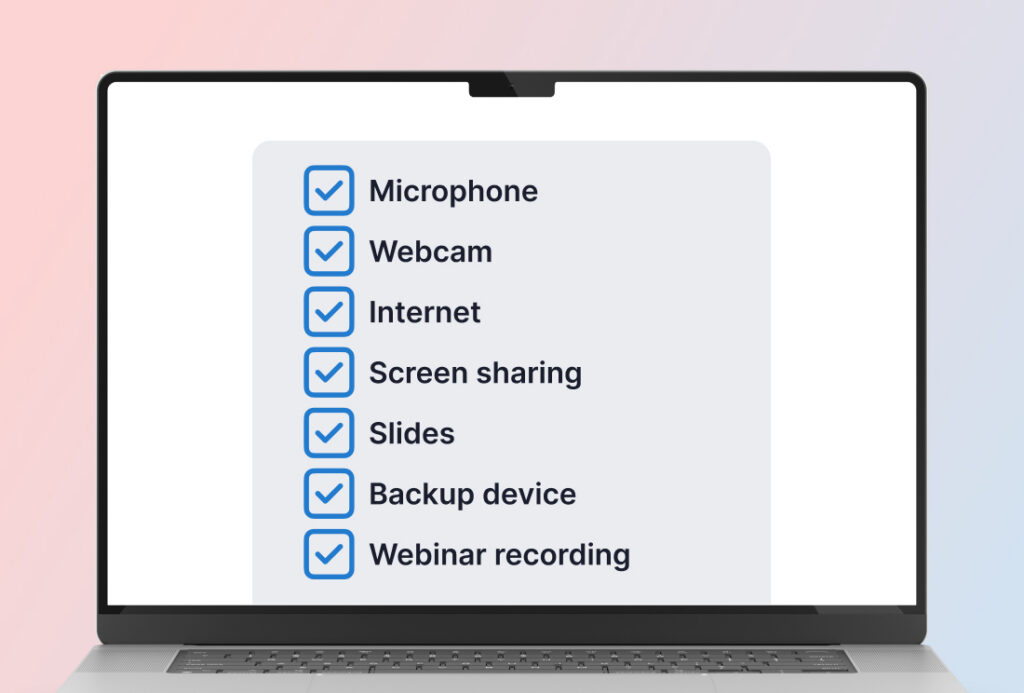
Before your live webinar:
- test your microphone
- test your webcam
- check lighting
- run an internet speed test
- close unnecessary browser tabs
- test screen sharing
- practice switching between slides and presenter view
You should also do a complete dry run before the webinar starts.
A proper run-through helps identify:
- broken links
- slide timing issues
- audio delays
- webinar room confusion
- presenter handoff problems
Small technical issues feel much bigger to webinar attendees when they happen live.
Clear audio matters especially. People will tolerate average video quality, but poor sound often causes attendees to leave quickly.
Set Up Your Webinar Room and Presentation
A clean webinar presentation keeps attendees focused.
That doesn’t mean your slides need to look overly designed.
Simple and readable usually works best.
Your webinar room setup should include:
- presentation slides
- polls or engagement tools
- chat settings
- downloadable resources if needed
- clear transitions between sections
If you’re hosting a panel discussion, make sure all co-hosts understand:
- timing
- speaking order
- audience questions
- transition points
Avoid overcrowding slides with too much text.
Your attendees joined the webinar to hear your expertise, not read paragraphs on a screen.
Create a Backup Plan
Even experienced presenters run into technical issues occasionally.
That’s why backup plans matter.
At minimum, prepare:
- a backup internet source
- a second device
- a webinar recording backup
- emergency support contact information
- a moderator or assistant if possible
If your webinar serves multiple time zones, clearly communicate replay access in advance in case some registrants can’t attend live.
Knowing you have backups in place helps you stay calm if something unexpected happens during the live webinar.
Webinar Registration Page Checklist
Your webinar registration page has one job: it needs to convince the right people to sign up.
That’s it.
A common mistake is trying to make the page too clever or too detailed. Simplicity usually converts better.
Write a Headline Focused on the Outcome
The best webinar headlines focus on results.
Attendees don’t register because the webinar sounds interesting. They register because they believe it will help them solve something important.
A simple framework is:
How to [desired result] without [pain point]
Examples:
- How to Improve Patient Retention Without Increasing Staff Hours
- How to Reduce Inventory Waste Without Changing Suppliers
- How to Train New Managers Without Pulling Senior Leaders Away From Operations
Clear beats clever almost every time.
Clarify What Attendees Will Learn
People want to know exactly what they’re getting.
Your landing page should clearly explain:
- what the webinar covers
- who it’s for
- what attendees will walk away with
Bullet points work well here because they make the page easier to skim. For example:
- Learn the 3 onboarding mistakes increasing customer churn
- See the reporting system top-performing agencies use to retain clients
- Discover how to streamline internal communication during rapid growth
Specific outcomes create stronger webinar registration rates.
A good rule is this: if a registrant can’t explain the webinar’s value in one sentence, the messaging probably isn’t clear enough yet.
This is also a good place to tease downloadable resources, templates, or bonus materials attendees will receive.
Reduce Friction in the Registration Process
Every extra step reduces conversions.
Your registration page should feel simple and easy to complete.
Best practices include:
- short registration forms
- mobile-friendly design
- one clear CTA button
- minimal distractions
- fast loading speed
Even small improvements can increase webinar attendees significantly over time. But for many business owners, writing the page itself is the hardest part.
Need a Faster Way to Write Your Webinar Registration Page?
Most webinar landing pages fail because the messaging feels vague or overloaded.
The WebinarJam Kit includes Registration Page Copy Blocks and templates you can adapt for:
You’ll also get the complete webinar system for improving attendance, follow-up, and conversions.
Webinar Promotion Checklist
You can have an excellent webinar presentation and still struggle with attendance.
Promotion matters.
Reminder systems matter even more.
Build an Email Reminder Sequence
Many webinar attendees intend to show up but forget.
That’s why reminder emails and consistent email campaigns are critical.
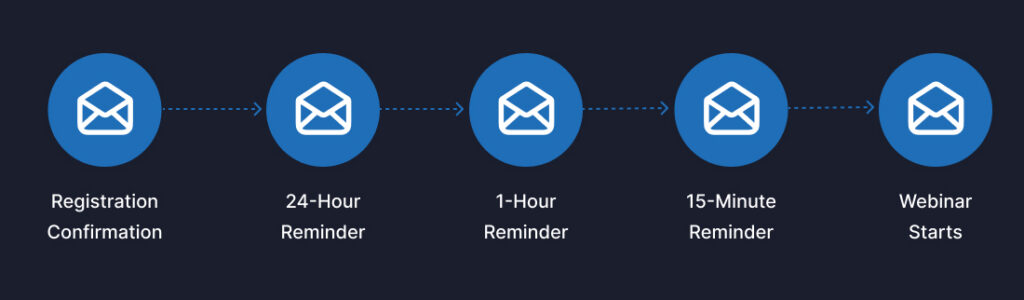
A simple webinar reminder sequence often includes:
- confirmation email immediately after registration
- reminder 24 hours before
- reminder 1 hour before
- reminder 15 minutes before
Your reminders should feel helpful, not pushy.
Focus on reinforcing the value of attending live.
For example:
“You’ll leave with a practical framework you can apply immediately.”
That kind of messaging improves attendance rates more effectively than generic reminders.
Promote Your Webinar Across Multiple Channels
Don’t rely on one traffic source.
For most coaches and consultants, the highest-performing webinar promotion channels are usually:
- email lists
- LinkedIn content
- strategic partnerships
- niche communities
- podcast appearances
Those channels typically produce warmer registrants than broad social posting alone.
Different registrants discover webinars in different ways.
Consistency matters more than trying to be everywhere at once.
Start with the channels where your audience already trusts you. For many consultants and coaches, that’s usually email and LinkedIn before paid traffic or large social campaigns.
Use Scarcity and Specificity Ethically
Urgency works best when it’s honest.
You don’t need exaggerated claims or fake countdown timers. Instead, focus on:
- limited live Q&A opportunities
- bonus resources for attendees
- replay expiration windows
- timely or relevant topics
Clear and specific messaging builds more trust than hype.
That trust matters when attendees decide whether to stay engaged during the webinar and take the next step afterward.
Live Webinar Delivery Checklist
Going live can feel intimidating.
But strong webinar delivery usually comes down to preparation and pacing, not perfection.
Start Strong in the First 5 Minutes
The opening minutes set the tone for the entire webinar.
If the beginning feels disorganized, attendees may mentally check out before you reach the valuable parts of the presentation.
Start by:
- welcoming attendees
- setting expectations
- explaining what they’ll learn
- sharing why the topic matters
Keep the introduction concise.
Most attendees joined because they want solutions, not a long personal backstory.
Keep Engagement High Throughout the Webinar
Webinars work better when attendees feel involved.
Simple interactive features help maintain attention:
- polls
- chat questions
- quick exercises
- short stories
- examples
For instance, if you’re teaching restaurant owners about customer retention, you might ask:
“What’s your biggest challenge with repeat business right now?”
That kind of interaction improves audience engagement and keeps webinar attendees mentally present.
It also gives you insight into their priorities and objections.
Transition Naturally Into the Offer
One of the biggest webinar mistakes is making the sales portion feel abrupt.
A better approach is to position your offer as the logical next step.
For example:
- explain the problem
- teach the framework
- show what implementation looks like
- introduce the offer as support for achieving the outcome faster
That transition feels more helpful and less forced.
People rarely object to offers that feel aligned with the value they already received during the webinar.
Webinar Follow-Up Checklist Most People Skip
A webinar doesn’t end when the presentation ends.
In many cases, the real conversions happen after the webinar ends.
That’s why webinar follow-up matters so much.
Send the Replay Quickly
Send the replay while the webinar is still fresh in attendees’ minds.
Waiting too long reduces engagement and conversions.
Your replay email should:
- remind attendees what they learned
- reinforce the key outcome
- include a clear replay link
- explain how long the replay will remain available
Simple and direct usually works best.
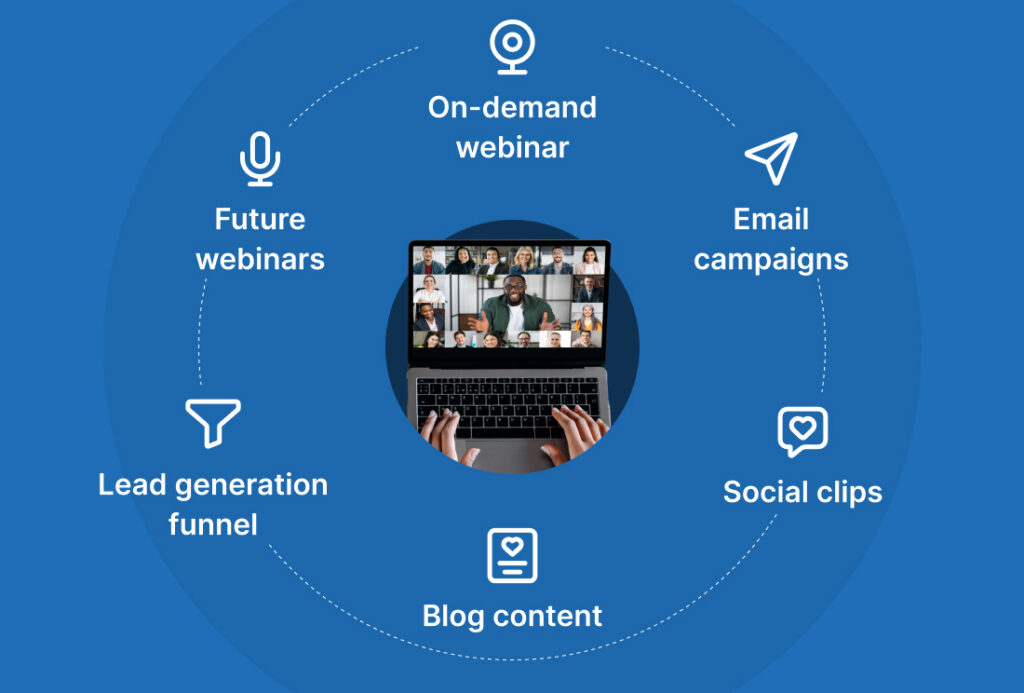
You can also use the webinar recording later for repurposing into:
- short social clips
- blog content
- email campaigns
- future webinars
- training resources
Follow Up With Different Types of Attendees
Not all webinar attendees need the same message.
Some attended live.
Some registered but missed the webinar entirely.
Some watched but didn’t take action.
Segmenting your follow-up improves results because the messaging feels more relevant.
For example:
- live attendees may receive deeper implementation content
- no-shows may receive a shorter replay-focused email
- interested prospects may receive case studies or FAQs
You can also send a short webinar survey to better understand attendee feedback and improve future webinars.
Personalization doesn’t need to be complicated to be effective.
Better Attendance Starts With Better Reminder Systems
Most webinar registrants don’t skip because they’re uninterested.
They skip because distractions pile up, calendars fill up, and your webinar stops feeling urgent the moment they leave the registration page.
The WebinarJam Kit includes the Show-Up System, a practical framework for improving attendance rates with:
You’ll also get the full 4-part webinar system used to create smoother webinar experiences from registration through follow-up.
Continue the Conversation After the Webinar
Many attendees need time before making a decision.
That’s normal.
Strong webinar follow-up continues addressing:
- objections
- concerns
- timing questions
- implementation fears
For example, a business operations consultant might share a post-webinar client story showing how a small process change reduced employee turnover.
Those examples help attendees connect the webinar ideas to real-world outcomes.
Consistency matters here.
A single follow-up email rarely maximizes webinar conversions on its own.
Your Webinar Checklist Is Only One Part of a Bigger System
A successful webinar isn’t just about one presentation.
It’s about building a repeatable process that continues generating leads, conversations, and sales over time.
That’s where systems become important.
The Best Webinars Are Repeatable
Once you’ve validated a webinar topic, you can reuse and improve it.
Many businesses turn one successful live webinar into:
- an automated webinar funnel
- an on-demand webinar
- a lead generation system
- a high-quality evergreen training asset
- a recurring sales mechanism
That kind of leverage helps experts grow without constantly creating from scratch.
Simplicity Beats Complexity
A lot of webinar advice online feels overwhelming.
Multiple funnels. Complicated automation. Endless integrations.
Most businesses don’t need another disconnected tool or complicated funnel they’ll abandon two weeks later.
They need:
- a clear webinar topic
- reliable webinar software
- consistent promotion
- structured follow-up
- repeatable systems
Simple systems are easier to maintain and improve over time.
What to Focus on First
If you’re feeling overwhelmed, focus on the fundamentals first.
In order of importance:
- Clear offer
- Strong landing page
- Reliable reminder system
- Helpful webinar presentation
- Consistent follow-up
You don’t need a perfect webinar to start getting results.
You just need a repeatable process that helps each webinar feel easier, smoother, and more profitable than the last.
Final Thoughts: Use This Webinar Setup Checklist to Go Live With Confidence
Most webinar success comes from preparation, not perfection.
When your webinar setup is clear and organized, it becomes much easier to focus on helping attendees instead of worrying about technical problems or forgotten steps.
That’s especially important for coaches, consultants, experts, and solopreneurs who already have deep expertise but want a simpler way to scale it online.
Because the goal isn’t just to run better webinars. It’s to stop feeling like every webinar has to be rebuilt from scratch every single time.
A strong webinar system helps you:
- build trust faster
- create repeatable lead generation
- deliver value at scale
- grow without adding more chaos to your business
Start simple.
Improve with each webinar.
And focus on creating a webinar experience that feels clear, useful, and valuable for the people attending.
Ready to Turn Your Webinar Into a Repeatable Growth System?
A successful webinar isn’t just about going live once.
It’s about creating a repeatable process that helps you:
The WebinarJam Kit gives you the exact frameworks behind profitable webinars that run on repeat.
Inside you’ll get:
Simple systems built for experts who want webinars that feel organized, professional, and repeatable instead of stressful and improvised.