

Writing a webinar script is easy, right up until you have to start selling.
You’ve got the slides. You know what you want to teach. Then you reach the transition into your offer and suddenly every sentence feels awkward. Too soft, and the pitch comes out of nowhere. Too salesy, and it feels like you’ve become a different person halfway through.
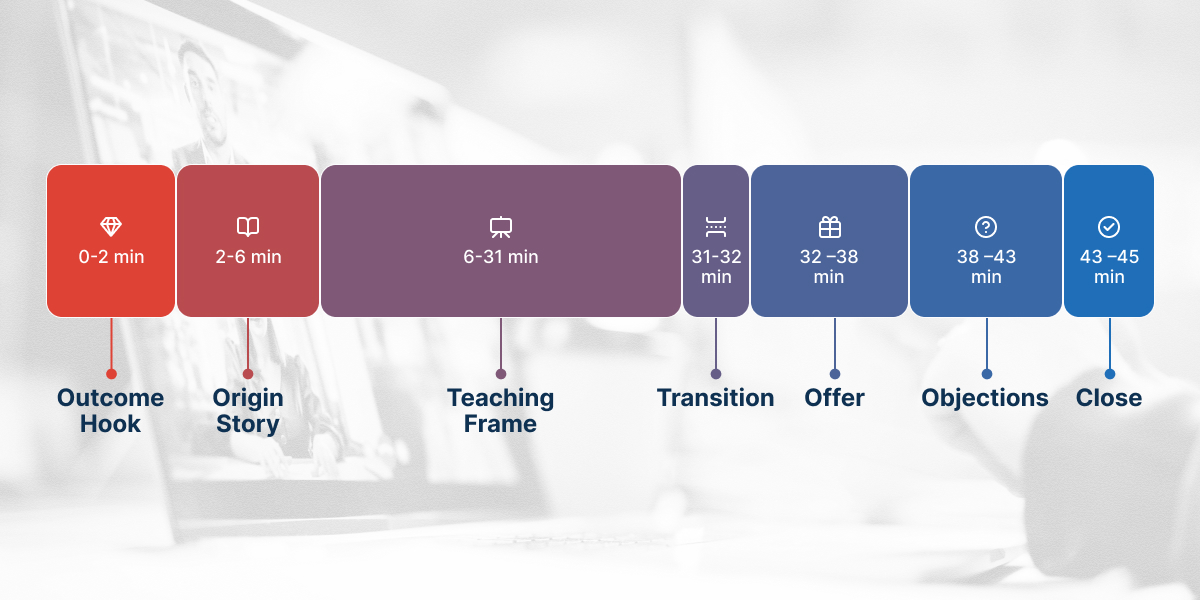
That transition is only one of seven parts that can make or break the sale: the hook, origin story, teaching frame, transition, offer, objections, and close.
Most webinar script templates don’t help here. They give you “Welcome, everyone,” housekeeping, and Q&A notes, then stop exactly where the selling starts. That’s moderator copy, written for a panel with three guest speakers.
This guide doesn’t. You’ll get actual script blocks for all seven sections, including the words that carry you from teaching into the offer.
Copy them. Replace the brackets. Read them aloud. Cut anything that doesn’t sound like you.
Table of Contents
What makes a webinar script different from a talk?
A webinar script has to earn attention. The kind of attention where you choose to stay and watch.
Nobody walks out of a conference room mid-sentence. They’d have to stand up and walk past you. Online, they just close a tab, no awkwardness, no goodbye, and you won’t know it happened until you check the numbers.
So every section needs a reason to stay for the next one. A talk can build slowly to a payoff. A webinar has to keep promising and delivering.
Read every block aloud before you use it. Written and spoken English are different languages, and the tell is always the same: sentences you can’t say in one breath.
This guide doesn’t cover where each section sits in your deck. Slide order, timing, and webinar structure are a separate problem, covered elsewhere. This is about the words.
1. What should you say at the start of a webinar?
Name the outcome and the timeframe in the first thirty seconds. Not your name, not your company, not the agenda.
Every instinct says open with a warm welcome and your credentials. Resist it. Everyone in that room is deciding whether this was worth showing up for, and “hi, I’m the founder of” doesn’t answer that.
Script block: the outcome hook
Over the next 45 minutes, I’ll show you exactly how [specific outcome] the same approach that [proof point]. If you’re [audience descriptor] and you’ve been struggling with [specific problem], you’re in the right room.
Script block: the pattern interrupt
Before I introduce myself, something that’ll sound strange coming from someone about to teach you [topic]. Most of what you’ve been told about [topic] is aimed at [wrong audience], which is why it hasn’t worked for you.
That reframe does two things at once. It explains why they’ve struggled without blaming them, and it positions everything that follows as new.
There’s data behind that emphasis on engagement, too. According to Univid’s 2026 platform data, webinars averaging 0–1 reactions per attendee see CTA conversion below 20%, compared with 69% for webinars averaging 5–10 reactions per attendee. That doesn’t prove reactions cause conversions; more interested attendees are likely to both engage and buy. But the gap is big enough to make engagement worth designing into the session.
Same with polls. One early, then more wherever you’re losing people. Not spread evenly through the deck because the software lets you.
In WebinarJam: trigger your first poll here, not at the halfway mark. On a live webinar, it also tells you what kind of room you’ve got before you commit to a pace.
2. How do you tell your story without sounding self-important?
Lead with the failure, not the credential. A personal story earns authority by showing you understand the problem from the inside, and the part doing that work is where you were stuck.
Most people run it backwards. They open with the win, revenue number, client list, logos, and the audience hears bragging before they’ve been given a reason to care.
Nobody’s impressed that you’re successful. They’re interested that you were once where they are.
Script block: the before state
Five years ago I was [specific unflattering situation]. I’d tried [solution one], [solution two], [solution three]. Nothing moved. I remember [specific moment] and thinking there had to be something I wasn’t seeing.
Script block: the turning point
What changed wasn’t working harder. It was realizing that [core insight]. And once I saw it, I couldn’t unsee it, every time [problem] showed up, it traced back to the same thing.
Script block: the credential, placed last
Since then I’ve [result] and helped [number] [audience] do the same. Not telling you to impress you, telling you because everything I’m about to show you came out of getting it wrong first.
Keep this under four minutes. It’s tempting to run long because it’s the part you know best. But the story earns permission to teach. It isn’t the teaching.
3. How do you teach without giving away so much they don’t need you?
Give away the what and the why. Hold back the how at scale.
Teach too little, and you haven’t earned the pitch. Teach too much and everyone leaves satisfied instead of curious. The line is simpler than it feels: people should finish knowing exactly what needs to happen, and that doing it alone would take months.
Write it as talking points, not full sentences. You want room to react to the chat, and reading verbatim for twenty-five minutes is where presenters start to sound like they’re narrating a document. Graphs, infographics, and other visual aids carry more load here than anywhere else, the words explain what people are looking at rather than replacing it.
Script block: framing each teaching point
The first thing you need to understand is [principle]. Here’s why that matters: [consequence of not knowing it]. Let me show you what this looks like in practice.
Script block: the mid-session re-engagement
Quick check: how many of you have hit [specific problem]? Type one in the chat if that’s you. [Pause.] Okay, that’s most of the room. This next part is going to land.
Script block: closing a teaching point
So that’s [principle one]. On its own it’ll get you [partial result]. Combined with the next two, it’s the whole system, and the third one is where most people go wrong, so stay with me.
That last clause is doing the work. Every teaching point should end with a reason to hear the next one, or you’re relying on goodwill to carry people through twenty-five minutes.
In WebinarJam: attach handouts here, not at the end. A worksheet at minute 15 gives people a reason to stay and tells your webinar platform who’s engaged, the segment your follow-up emails should treat differently. Our guide to timing polls, offers and handouts inside the session covers the setup behind all of this.
4. How do you transition from teaching into the offer?

Ask permission and name what’s happening.
This is the part you’ve been dreading, and the one no template writes for you. Everyone can feel the gear change. Pretending it isn’t happening costs you more than saying it out loud.
So say it out loud.
Script block: the permission transition
So that’s the whole framework. You could take this and implement it yourself; some of you will, and honestly, good. But it took me [timeframe] to work out, and I’ve built a way to get there in [shorter timeframe]. Can I take four minutes to show you? If it’s not for you, no problem; stick around anyway, I’m doing Q&A after.
Script block: the “you have three options” transition
You’ve got three choices. Do nothing, which is fine if [problem] isn’t costing you much. Build this yourself; everything I showed you is real, and it works. Or take the shortcut. Let me show you the third, then you decide.
Script block: the natural bridge
Everything so far is what to do. The question I always get next is how to actually do it without [main obstacle]. That’s what I want to spend the next few minutes on.
Transitions fail three ways: apologizing, pretending, and rushing. Rushing is the most common: you’re uncomfortable, so you speed up, and the audience reads that speed as something to be suspicious of.
Slow down. Deliver the line, pause, and let it land.
In WebinarJam: don’t trigger the offer button on the transition line. Let the framing land, then display it as you describe what’s included, 60 to 90 seconds later. The Presentation-to-Action Script goes deeper on building the belief sequence that makes this transition land.
5. What do you actually say when you present the offer?

Describe the outcome before the contents, and name the price plainly.
The instinct is to lead with everything you’ve built: eight modules, twelve templates, a private community. Nobody’s ever bought a list of components. Tell them what they’ll be able to do, then show them what’s in the box.
Script block: the offer frame
[Product name] is [one-sentence description] for [specific audience]. It exists because [reason it was built]. By the end you’ll have [concrete outcome], not just know about it.
Script block: the contents
Here’s what’s inside. [Component one] handles [problem it solves]. [Component two] is for when [specific situation]. And [component three], which people tell me they use most, because [reason].
Script block: naming the price
[Product] is [price]. I’ll say that again so nobody’s guessing: [price]. If [problem] is costing you [cost of inaction], that pays for itself in [timeframe].
Script block: genuine urgency
This is open until [date/time]. After that the price goes to [higher price] and [bonus] comes off. Not to pressure you, people who decide in a week don’t do the work, and I’d rather have fewer people who start now.
Only use urgency that’s true. People check, and a deadline that quietly extends doesn’t just cost you that sale: it casts doubt on everything else you said for the last forty minutes.
In WebinarJam: keep the offer button on screen for this whole section. People who decide early shouldn’t wait for a call to action to appear, and where the CTA sits affects conversion rates more than the button wording.
6. How do you handle objections before they’re raised?
Say the objection out loud in the audience’s own words, then answer it.
You already know what they’re thinking. Naming it first takes the power out of it, waiting until someone types it gives the objection an audience and puts you on the back foot.
Four cover almost everything: too expensive, no time, won’t work for me, I’ll do it later.
Script block: price
Some of you are thinking that’s a lot of money. I get it. What’s it currently costing you to not solve [problem]? If it’s [figure] a month, this pays back in [timeframe]. If it’s costing you nothing, don’t buy it, you don’t need it yet.
Script block: time
The other thing I hear is “I don’t have time for this.” Fair. It’s [realistic time commitment], and I’d rather tell you upfront than have you find out in week two. If you can’t find that, wait until you can.
Script block: “my situation is different”
A lot of you are wondering whether this works for [specific situation]. Honest answer: it works well for [cases where it works], and it’s a stretch for [cases where it doesn’t]. If you’re in the second group, I’d say don’t.
Script block: procrastination
If you’re thinking you’ll come back to this later, you know how that goes. Nothing changes and [problem] is still there in six months. The decision isn’t about the money. It’s whether you solve this now or carry it another year.
Notice how often those blocks tell people not to buy. That’s deliberate, and it’s the strongest move here. Every honest disqualification makes the rest more believable, and the people you talk out of it were the refunds anyway.
7. How should you close a webinar?
Restate the outcome, give one instruction, then stop talking.
The last bit is harder than it sounds. Silence after you’ve asked for the sale is uncomfortable and the reflex is to fill it: one more testimonial, another bonus, a bit more Q&A. All of it lands after the decision moment has passed.
Script block: the close
That’s everything. To recap: [outcome one], [outcome two], [outcome three]. If you want that, the link is on your screen, and it closes [deadline]. Click it, fill in the form, and you’ll have access in about two minutes.
Q&A sessions work best when the offer stays visible through them, because the questions people ask out loud are usually the ones stopping them from buying.
Script block: closing with Q&A
I’ll stay on as long as there are questions. The link stays live while we do this, so if you’ve already decided, go ahead.
Script block: the last line
Whatever you decide, thank you for giving me an hour. That’s a lot, and I don’t take it lightly. Go and do something with what you learned today.
Don’t end on the sale. End on the audience. They gave you an hour, and saying so out loud costs you nothing.
In WebinarJam: keep the offer button live through Q&A and into the replay window, a meaningful share of purchases happen after the presentation ends. Running the same script as an automated webinar means setting that timing once, since nobody’s there to adjust it live. For what to send after the session ends, the sequences are a separate job from the script.
Common questions
How do I write a webinar script?
Write the offer first and work backwards. Once you know the ask, the teaching section tells you what your target audience needs to believe before they’ll say yes, and the hook tells you who to filter in. Then draft it in speech rather than prose; sentence structure that works on a page often can’t be spoken aloud.
What should I say at the start?
The outcome and the timeframe, within thirty seconds. Name what they’ll be able to do by the end and how long it’ll take. Save your introduction until after you’ve given people a reason to stay.
Do I need a different script for each webinar in a series?
The hook and close change; the middle usually doesn’t. If you’re running a webinar series, keep the teaching frame and offer language consistent and rewrite only the opening; repeat attendees notice repetition in the first two minutes long before anywhere else.
Should a webinar script be word-for-word or bullet points?
Both. Word-for-word for the hook, transition, offer, and close- the four moments where exact wording decides whether it works. Bullets for the teaching, so you can respond to the room.
How long should each section be?
For a 45-minute session: two minutes on the hook, four on the story, twenty-five on teaching, one on the transition, six on the offer, five on objections, two on the close. Adjust to your material, but protect the transition; rushing it undoes everything before it.
What if nobody buys?
Look at where they left before rewriting the offer. Dropped before the transition means the teaching didn’t earn the pitch. Stayed through the offer without moving means the problem is the offer or the price. Of all your webinar KPIs, attendance at the offer moment tells you which conversation to have; reading your webinar analytics covers how to find it. And if registrations were fine but attendance wasn’t, the problem sits upstream in your landing page, email marketing, or the sales funnel rather than the script