

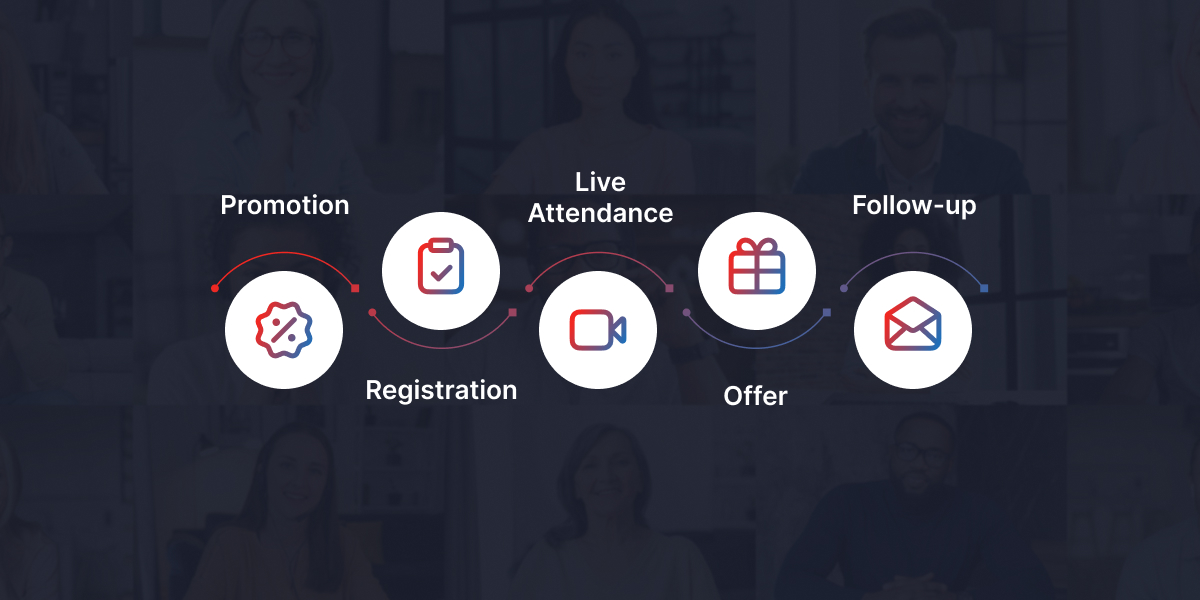
A webinar funnel is the full path from promotion to registration, live attendance, offer response, replay, and follow-up. When that path underperforms, the issue is rarely the entire funnel. More often, one stage is creating most of the drop-off.
That is why “more registrants” is not always the answer.
If your webinar funnel is losing people between registration and attendance, more promotion only creates more no-shows. If it is losing people during the offer, a bigger audience only puts more people in front of a weak transition. If it is losing people after the replay, the problem may be follow-up, not the webinar itself.
Benchmark data shows why this matters. Goldcast’s 2024 B2B Webinar Benchmark Report analyzed 6,000+ webinars across nearly 300 B2B brands, using data from January through December 2023. The dataset included more than 1.7 million webinar registrants and more than 613,000 attendees across live and on-demand formats. (goldcast.io)
Use that as context, not a universal target. Your own webinar attendance rate will depend on your audience, topic, traffic source, reminder sequence, offer, timing, and reason to attend live.
The goal is not to chase one benchmark. The goal is to find where your webinar funnel is losing people, then fix that stage before rebuilding the whole campaign.
What Is a Webinar Funnel?
A webinar funnel is the sequence that moves someone from initial interest to registration, attendance, engagement, offer consideration, replay viewing, and follow-up action.
That action might be buying a product, booking a call, enrolling in a course, starting a trial, attending a training, or watching the replay. The goal is not just to collect registrations. The goal is to move the right people through a clear path from interest to attendance to action.
A typical webinar funnel includes:
- Traffic source
- Registration page
- Confirmation page
- Reminder sequence
- Live webinar room
- Engagement during the session
- Offer or next step
- Replay
- Follow-up
- Analytics review
The live webinar is only one stage. The decision to attend is shaped before the session starts. The decision to buy, book, enroll, or continue is often shaped after it ends.
The Webinar Funnel Map: Where Registrants Drop Off
Use this map to find where your webinar funnel is breaking before you change your topic, offer, platform, or promotion plan.
TRAFFIC
↓
REGISTRATION PAGE
Problem: the promise is too vague, so visitors do not sign up
↓
CONFIRMATION PAGE
Problem: the registrant gets no clear reason to attend live
↓
REMINDER SEQUENCE
Problem: reminders repeat the date but do not rebuild interest
↓
JOIN / LIVE ROOM
Problem: the registrant wants to attend but cannot find the link
↓
EARLY ENGAGEMENT
Problem: the attendee shows up but starts multitasking
↓
OFFER / CTA
Problem: the pitch feels disconnected from the lesson
↓
REPLAY
Problem: the viewer gets a recording but no reason to act
↓
FOLLOW-UP
Problem: everyone receives the same message
↓
BUYER / BOOKED CALL / ENROLLMENT / NEXT ACTION
The best fix is usually the narrowest fix. A webinar funnel does not need more complexity until each stage is doing its basic job.
A Simple Webinar Funnel Audit
Start with one question: where are people dropping off?
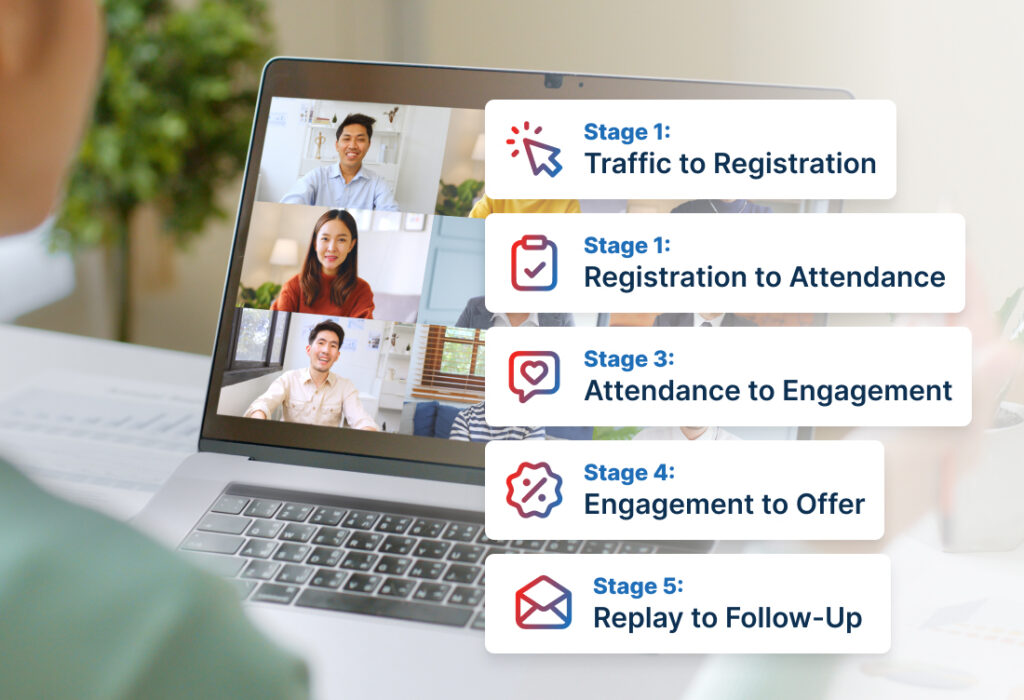
| Webinar funnel stage | What is going wrong? | One fix to test |
| Traffic to registration | Visitors do not sign up | Rewrite the title around one specific outcome |
| Registration to attendance | Registrants do not show up | Use reminders that rebuild the value of attending live |
| Reminder to join | People cannot find or use the join path | Put one clear join link in the final reminders |
| Attendance to engagement | Attendees arrive but stay passive | Ask one useful question in the first 10 minutes |
| Engagement to offer | Attendees listen but do not act | Connect the offer to the problem taught in the webinar |
| Replay to follow-up | Replay viewers do not move forward | Segment follow-up by behavior |
This is the main diagnostic table the article needs. The rest of the work is understanding each stage well enough to fix it.
Stage 1: Traffic to Registration
The first webinar funnel problem happens before someone becomes a registrant.
They see the webinar invitation, understand the general topic, and still leave because the promise is not specific enough.
This is usually not a button-color problem. It is not always a form-length problem. It is often a reason-to-care problem.
A weak webinar title sounds like this:
Join our free webinar on growing your business.
That could mean almost anything.
A stronger title sounds like this:
Find the three webinar funnel stages where qualified registrants drop off before they attend, engage, or take action.
The stronger version gives the reader a job. It tells them what they will diagnose and why the session matters.
The fix: rewrite the promise around one outcome
Before changing the page design, answer four questions:
- Who is this webinar for?
- What problem will they understand better after attending?
- What decision will they be able to make?
- Why should they attend live instead of waiting for the replay?
If those answers are vague, the registration page will struggle even if the design looks polished.
A good webinar promise does not need to be dramatic. It needs to be clear enough that the right person thinks, “That is the problem I need to solve.”
Stage 2: Registration to Attendance
This is where many webinar funnels lose momentum.
People register. The list grows. The team feels good about the campaign. Then the live session starts, and a large part of the registration list is missing.
The easy explanation is that people forgot.
Sometimes they did. But often the webinar simply stopped feeling important between registration and the event. The original promise faded. The confirmation message felt transactional. The reminders sounded like calendar alerts instead of reasons to attend.
A reminder sequence should not just say, “This is happening.” It should make the registrant remember why they cared.
The fix: give every reminder a job
Do not send the same reminder five times.
A strong reminder sequence moves the registrant closer to attendance.
The confirmation message reinforces the topic and makes the next step clear.
The day-before reminder rebuilds the value of attending.
The morning-of reminder reduces scheduling friction.
The one-hour reminder makes the join path obvious.
The final reminder creates immediacy: the session is starting, and here is where to go.
A weak reminder says:
We’re excited to see you tomorrow.
A stronger reminder says:
Tomorrow’s session will help you find whether your webinar funnel is leaking before attendance, during engagement, or after the offer — so you know which stage to fix first.
The second message keeps the original problem alive. That is what a reminder sequence should do.
For example, if your webinar funnel is losing people between registration and attendance, the fix is not just “send more emails.” In WebinarJam, the live webinar workflow can include registration, notifications, confirmation steps, live-room setup, replay-related workflows, and analytics where configured. That gives the host a way to plan the attendance path as one sequence: promise, confirmation, reminders, join experience, live session, replay, and review. The platform supports the workflow, but the show-up rate still depends on the topic, timing, message quality, and audience intent.
An anonymized example: the reminder sequence was doing the wrong job
In one anonymized product-demo review, the team had strong registrations but weak live attendance. The first assumption was that the topic had gone stale.
A closer review showed a simpler issue: every reminder repeated the date and time, but none restated the reason to attend live. The best value of the session was access to live product Q&A, yet that point appeared only on the registration page.
The next test did not change the offer, platform, or promotion plan. The team rewrote the reminders so each message had a job: confirm the promise, restate the value of live Q&A, simplify the join path, and create immediacy before the session.
That is the kind of test worth running before rebuilding the webinar funnel.
Stage 3: Reminder to Join
Some registrants plan to attend and still miss the live session.
They cannot find the link. They are on mobile. The time zone is unclear. They registered days ago and do not remember which email to search for.
That is not always an intent problem. It is often a friction problem.
The fix: make joining obvious
Every final reminder should answer three questions quickly:
- When does it start?
- Where do I click?
- What should I expect when I arrive?
Use direct CTA text:
Join the live webinar
Avoid vague CTA text like:
Click here
Access now
Learn more
The join link should not make the registrant interpret what to do next.
WebinarJam supports several registration paths, including hosted registration pages, embedded registration forms, one-click registration for existing contacts, and API registration for custom workflows. For this stage of the webinar funnel, the priority is not using every available option. It is choosing the registration and join path that creates the least confusion for your audience.
One caution: direct live-room links should not be used as a general promotion shortcut unless that is the intended setup. Direct room links can bypass the normal registration process and may affect tracking.
Stage 4: Attendance to Engagement
A registrant who shows up is not automatically engaged.
If the first 10 minutes are housekeeping, long introductions, and technical setup, attendees learn that they can safely multitask. Once that habit forms, it is hard to pull them back.
The first few minutes should prove that the session is worth active attention.
The fix: ask one useful question early
The first interaction should help the host understand the room. It should not be engagement theater.
Good early prompts include:
- Which part of your webinar funnel is weakest right now: registration, attendance, engagement, offer, or follow-up?
- Have you run this webinar before, or is this your first version?
- Are you trying to drive booked calls, product purchases, course enrollments, trial signups, or training attendance?
These questions do two useful things. They give the presenter information, and they make attendees feel like the session is connected to their situation.
WebinarJam’s live room can support interaction through features such as chat, Q&A-style organization, polls, offers, slides, files, and presenter controls when configured. But the tool is only useful when the interaction has a purpose.
A poll is useful if the host uses the answer. It is filler if the host reads the result and continues with the same script.
Stage 5: Engagement to Offer
This webinar funnel problem shows up when people attend, pay attention, and still do not take the next step.
Sometimes the offer is wrong. Sometimes the audience is wrong. But often the transition is the issue.
The host teaches one thing, then suddenly pitches something that feels separate from the lesson. Attendees may understand the content, but they do not understand why the offer is the logical next move.
The fix: bridge the lesson to the offer
The offer should feel like the next step from the problem the webinar helped the audience understand.
Use this sequence:
- Name the problem the webinar surfaced.
- Explain why that problem is hard to fix alone.
- Show what the next step helps them do.
- Clarify who the offer is for.
- Give a direct CTA.
Example:
If you found that your biggest leak is between registration and attendance, the next move is not more traffic. It is fixing the confirmation, reminder, and join experience so the people who already raised their hands are more likely to attend live.
That transition earns the offer. It does not force it.
If your webinar includes an in-room offer, plan the timing before the event. WebinarJam can support product offers inside the webinar room, including offer details and a button linking to a sales page when configured. The offer still needs to be relevant, clear, and connected to the webinar content.
Stage 6: Replay to Follow-Up
A replay is not a follow-up strategy by itself.
It is only useful if the person receiving it knows why to watch and what to do after watching.
The person who missed the webinar, the person who attended for 10 minutes, and the person who clicked the offer are not in the same position. They should not receive the same follow-up.
The fix: segment follow-up by behavior
You do not need a complicated system to start. Begin with a few basic groups.
Registered but missed: Give them a reason to watch one specific section.
Attended briefly: Point them to the part they likely missed.
Attended most of the session: Give them the next-step checklist or decision guide.
Asked a question: Send a resource connected to their question.
Clicked the offer: Help them evaluate the next step.
A weak replay follow-up says:
Here is the replay. Watch it before it expires.
A stronger replay follow-up says:
If you missed the live session, start with the section on registration-to-attendance leaks. It will help you see whether your reminder sequence, confirmation page, or join path is the first thing to fix.
That message gives the replay a job.
WebinarJam analytics can help users review areas such as registration page visitors, sign-up rate, total registrants, live attendance, replay attendance, show-up rate, engagement indicators, and revenue-related indicators where tracking is configured. Use those numbers to find the bottleneck, not to judge the entire webinar funnel from one metric.
How to Improve Your Webinar Funnel Without Rebuilding It
When a webinar funnel underperforms, the instinct is to change something big: the promotion plan, the topic, the offer, the platform, or the whole presentation.
Sometimes that is necessary. But it is not the best first move.
Start with the smallest stage-specific fix:
- If visitors are not registering, fix the promise.
- If registrants are not attending, fix the confirmation page and reminders.
- If registrants intend to attend but miss the session, fix the join path.
- If attendees are passive, fix the first 10 minutes.
- If attendees do not act, fix the offer bridge.
- If replay viewers do not respond, fix the follow-up segmentation.
This keeps your webinar funnel from becoming a guessing game.
A single weak stage can make the whole funnel look broken. Fix that stage first.
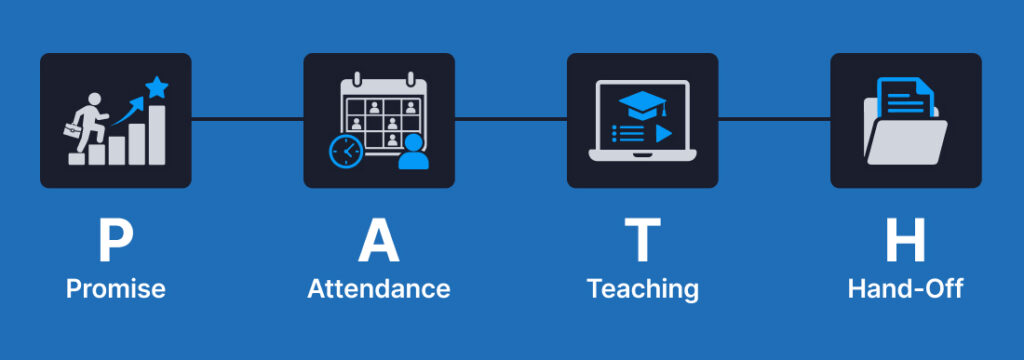
The P.A.T.H. Method for Fixing a Webinar Funnel
Use the P.A.T.H. method when the funnel feels messy and you need a simple way to prioritize.
P — Promise
Is the webinar topic specific enough to make the right person register and attend live?
A vague promise weakens more than the registration page. It also weakens attendance, because reminders have less value to reinforce.
Ask:
Would someone understand why this is worth attending live?
If the answer is no, fix the promise before changing the reminder sequence.
A — Attendance
Do the confirmation page, reminders, and join path keep the registrant committed?
Attendance is not one email. It is a sequence of small commitments: registration, calendar add, reminder open, join click, live-room entry.
Ask:
Are we helping the registrant remember the value, or are we only repeating the time?
If the reminders sound like calendar alerts, rewrite them around the reason to attend.
T — Teaching
Does the live session earn attention before asking for action?
A webinar can lose people even when they technically show up. If the opening is slow, the examples are generic, or the session waits too long to invite participation, attendees may become passive before the important material begins.
Ask:
What happens in the first 10 minutes that proves this session is worth active attention?
If nothing happens, add one useful interaction early.
H — Hand-Off
Does the offer, replay, and follow-up move each person to the right next step?
The hand-off is where many webinar funnels become too generic. Everyone gets the same replay. Everyone gets the same CTA. Everyone receives the same “last chance” message, even though their behavior was different.
Ask:
What should this person receive based on what they did?
Missed registrants need a reason to watch. Attendees need a next step. Question askers need relevance. Offer clickers need decision support.
Where WebinarJam Fits Into the Webinar Funnel
WebinarJam is a fit when your webinar funnel depends on a scheduled, live, interactive event.
That includes webinars where you need registration, reminders, live presentation tools, chat, Q&A, polls, offers, replays, and post-event review. WebinarJam is positioned for live, interactive webinar experiences where hosts present in real time, engage attendees, answer questions, and guide the audience toward a clear next action.
It is not a shortcut around strategy.
If people are registering but not attending, review the promise, confirmation page, reminder sequence, topic urgency, and join path. If people attend but do not act, review the teaching structure, offer timing, and follow-up.
The platform can support the workflow. The webinar funnel still needs a clear promise, useful session design, and behavior-based follow-up.
Common Webinar Funnel Mistakes
Treating no-shows as forgetfulness only
A reminder can tell someone when to attend. It cannot fully rescue a webinar that stopped feeling valuable after registration.
Fix the perceived value, not just the timing.
Sending the same reminder over and over
If every reminder says “we’re excited to see you,” the sequence is doing one job repeatedly.
Better reminders confirm, rebuild value, reduce friction, and create immediacy.
Waiting too long to engage the room
If the first interaction happens halfway through the webinar, passive behavior is already established.
Ask for input early, then use the answer.
Pitching before the problem is clear
An offer feels abrupt when the audience does not understand why the next step matters.
The stronger move is to teach the problem clearly, show the cost of leaving it unsolved, then explain the next step.
Sending one replay email to everyone
The replay is not the same asset for every person.
For missed registrants, it is a catch-up path. For attendees, it is a review tool. For offer clickers, it is decision support.
FAQ
What is a good webinar attendance rate?
A good webinar attendance rate depends on your audience, topic, traffic source, reminder sequence, and reason to attend live. As one benchmark reference, Goldcast’s 2024 B2B Webinar Benchmark Report analyzed more than 1.7 million registrants and more than 613,000 attendees across live and on-demand webinar formats.
Use that as context, not a universal target. Your best comparison is your own past webinar data from similar topics, audiences, and traffic sources.
Why do registrants not show up to webinars?
Registrants often do not show up because the webinar loses perceived value after registration, the reminders are too generic, the timing is inconvenient, or the join process is unclear.
Before assuming people simply forgot, review the registration promise, confirmation page, reminder sequence, calendar behavior, time-zone clarity, and final join email.
How do I increase my webinar show-up rate?
To increase your webinar show-up rate, make the webinar feel worth attending live, reinforce that value in the reminder sequence, and make the join path easy to find.
Start with the reminder sequence. Give every message a job: confirm the registration, rebuild value, reduce scheduling friction, simplify joining, and create immediacy before the event starts.
Where do webinar funnels usually leak?
Webinar funnels often leak between registration and attendance, during early engagement, and after the replay. The exact leak depends on the audience, offer, topic, traffic quality, reminder sequence, and follow-up.
Use the funnel stage data before making major changes. If registration is strong but attendance is weak, fix reminders and join friction. If attendance is strong but response is weak, fix offer timing and follow-up.
How does WebinarJam help with a webinar funnel?
WebinarJam can support a live webinar funnel through registration workflows, reminder and notification setup, live-room presentation tools, audience engagement features, in-room offers, replays, and analytics review.
It is most relevant when the webinar depends on live interaction, Q&A, polls, presenter control, and a clear next step after the session.